
Der Schlüssel zu Ihrem PC.
SystemLocker
Passwortloser Windows-Login und Datenschutz über einen physischen USB-Dongle. Steckt der Dongle, meldet der PC automatisch das richtige Benutzerkonto an, ganz ohne Passworteingabe. Fehlt der Dongle, bleiben Konto und Arbeitsdaten verschlüsselt und unzugänglich.
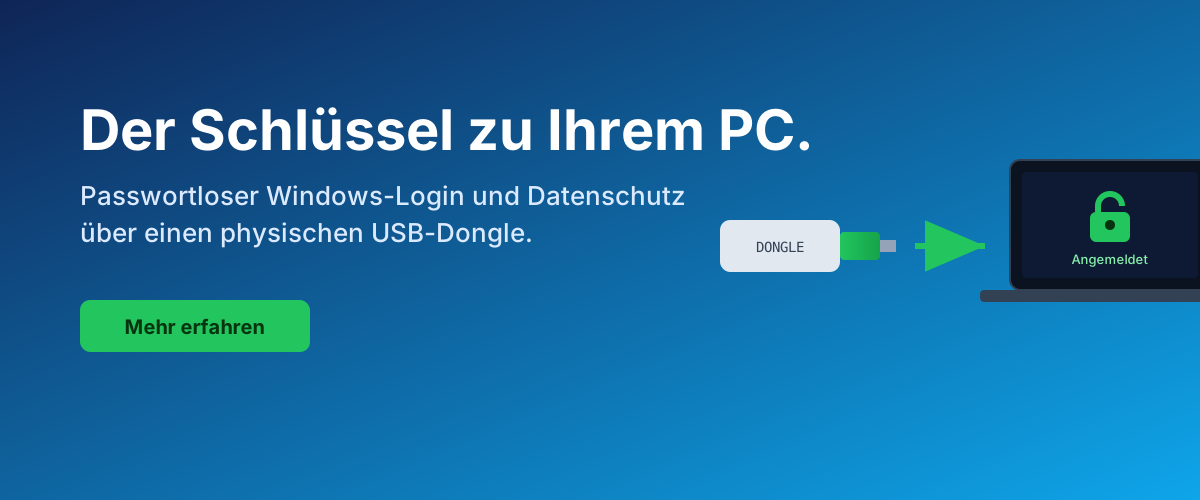

Der Dongle ersetzt die Passworteingabe und wählt das richtige Profil.

System und Arbeitsdaten mit BitLocker geschützt, kein Boot-Passwort nötig.

Verschiedene Dongles öffnen verschiedene Konten und Datenbereiche, kryptografisch getrennt.

Zentrale Wiederherstellung der Dongles über diese REST-API. Kopien für den Notfall.
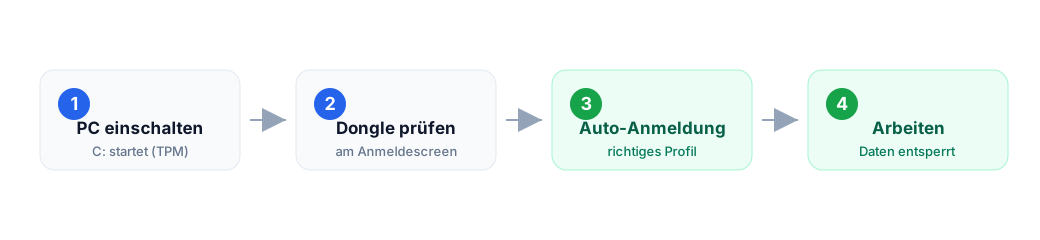
So funktioniert es in 3 Schritten
Screenshots aus der laufenden Anwendung


Alle sichtbaren Werte (Rolle, Konto TB\tboehme, Serial) sind Demo-Daten, keine echten Geheimnisse.
REST-API für den Wizard
Zentrale REST-API für den SystemLocker-WPF-Wizard. Speichert Dongle-Material
(clientseitig AES-256-GCM verschlüsselt), PCs, Metriken, Audit-Log in der Linkwerk-Datenbank.
Namespace: systemlocker/v1. Basis-URL:
https://www.tb-software.ch/ai/wp-json/systemlocker/v1/.
1. Auth-Modell
Zwei Auth-Klassen:
- Wizard (HMAC): jeder Request wird mit dem installations-eigenen
apiKeysigniert. Kein Token, keine Session. Header:X-SL-Installation,X-SL-Timestamp,X-SL-Nonce,X-SL-Signature. - Admin: entweder WP-Admin-Login mit
manage_options-Recht (Cookies) oder HeaderX-SL-Admin-Secretmit dem Wert ausSL_ADMIN_SECRETinwp-config.php.
1.1 HMAC-Signatur berechnen (zwei Formate parallel unterstützt)
Der Server akzeptiert beide Formate. Neue Wizards nutzen v2, ältere v1.
v2 — Spec 2.0 (empfohlen, entspricht HmacRequestSigner.cs)
timestamp = ISO-8601 UTC ("2026-07-11T00:00:00Z")
nonce     = zufaellig, mind. 16 Byte
path      = "/dongles"                             # ab Namespace
body_hex  = hex(SHA256(body))                      # leerer Body: SHA256("")
canonical = f"{METHOD}\n{path}\n{timestamp}\n{nonce}\n{body_hex}"
signature = base64(HMAC-SHA256(key=apiKey, msg=canonical))

Headers:
  X-SL-Installation : <installationId>
  X-SL-Timestamp    : <timestamp ISO-8601>
  X-SL-Nonce        : <nonce>
  X-SL-Signature    : <signature base64>
v1 — Legacy (dot-format)
timestamp = int(Unix-Sekunden UTC)
nonce     = hex(random_bytes(16))
canonical = f"{timestamp}.{nonce}.{METHOD}.{fullpath}.{body}"
# fullpath = "/systemlocker/v1/dongles"  (mit Namespace-Prefix)
# body     = raw request body (leerer String bei GET)
signature = HMAC-SHA256(key=apiKey, msg=canonical).hex()
Server-Verifikation:
|now - timestamp| ≤ 300s(Clock-Drift-Toleranz)- Nonce nicht in Replay-Cache (transient, 5-6 min)
hash_equals(expected, signature)
2. Endpoint-Übersicht
| Methode | Pfad | Auth | Zweck |
|---|---|---|---|
| GET | /version | — | Server-Version, HMAC-Formate, Feature-Flags, bekannte Metric-Types |
| POST | /installations | Admin | Neue Installation anlegen (gibt apiKey + restorePassword EINMALIG zurück) |
| GET | /installations | Admin | Alle Installationen listen (ohne Secrets) |
| DELETE | /installations/{id} | Admin | Installation löschen (Audit) |
| GET | /installations/{id}/restore-password | Admin | Klartext-Passwort abrufen (Audit + Reveal-Warnung) |
| POST | /installations/{id}/restore-password/verify | HMAC | Restore-Passwort verifizieren ohne es preiszugeben |
| POST | /installations/{id}/rotate-api-key | Admin | Neuen apiKey generieren, alten invalidieren |
| POST | /pcs | HMAC | PC registrieren/updaten (pcId = SHA-256 der hardwareId) |
| POST | /dongles | HMAC | Dongle-Record speichern (material bereits verschlüsselt) |
| GET | /dongles | HMAC | Dongles der eigenen Installation (Query: pcId, role, withMaterial) |
| GET | /dongles/{dongleId} | HMAC | Einzeldongle inkl. material-Chiffrat laden |
| DELETE | /dongles/{dongleId} | Admin | Dongle-Record löschen (Audit) |
| POST | /metrics | HMAC | Metric oder Batch ingesten |
| GET | /metrics | HMAC/Admin | Metriken abfragen (pcId, type, fromUtc, toUtc) |
| GET | /audit | Admin | Audit-Log lesen (Filter: installationId) |
3. Datenmodelle
3.1 Installation
{
  "installationId": "b3f1a2c4-...",
  "customerName":   "Muster AG",
  "createdUtc":     "2026-07-09T10:00:00Z"
}
Beim Create zusaetzlich in der Antwort (EINMALIG, nie wieder abrufbar in Klartext):
{
  "apiKey":          "sl_...",     // Wizard-Secret fuer HMAC
  "restorePassword": "A7fH3...",   // 32 Zeichen, wird gebraucht wenn kein DPAPI-Cache
}
3.2 PC
Request POST /pcs:
{ "hostname": "TBS-PC01", "os": "Windows 10 19045",
  "machineGuid": "...", "hardwareId": "..." }

Response:
{ "pcId": "sha256-..." }
3.3 DongleRecord
{
  "dongleId":     "d1a2...",           // Server-vergeben
  "installationId":"b3f1...",
  "role":         "Main | Backup1 | ...",
  "serialNumber": 1364915896,
  "account":      { "userName": "timo", "domain": ".", "profileId": "S-1-5-21-..." },
  "pcId":         "sha256-...",
  "sessionId":    "...",
  "material": {
    "algo":       "AES-256-GCM",
    "kdf":        "Argon2id",
    "salt":       "base64",
    "nonce":      "base64",
    "tag":        "base64",
    "ciphertext": "base64"
  },
  "createdUtc":   "2026-07-09T10:06:00Z",
  "version":      1
}
Wichtig: K_d, S und das Windows-Passwort stecken NUR
im material.ciphertext, verschlüsselt mit dem Restore-Key aus
Argon2id(restorePassword, salt). Der Server sieht sie NIE im Klartext.
3.4 Metric
{
  "type":         "login_success | login_denied | dongle_removed | heartbeat | custom",
  "value":        1,
  "pcId":         "sha256-...",
  "dongleId":     "d1a2-... | null",
  "data":         { "beliebig": "json" },
  "timestampUtc": "2026-07-09T10:07:00Z"
}
4. Beispiele
4.1 Installation anlegen (Admin, curl)
curl -X POST "https://www.tb-software.ch/ai/wp-json/systemlocker/v1/installations" \
     -H "X-SL-Admin-Secret: $SL_ADMIN_SECRET" \
     -H "Content-Type: application/json" \
     -d '{"customerName":"Muster AG"}'

{
  "installationId": "b3f1a2c4-...",
  "customerName":   "Muster AG",
  "apiKey":         "sl_a1b2c3...",     <- unbedingt sichern
  "restorePassword":"A7fHmKq2X8...",    <- unbedingt sichern
  "createdUtc":     "2026-07-09T10:00:00Z"
}
4.2 Wizard: Dongle speichern (HMAC)
import time, secrets, hmac, hashlib, json, urllib.request

installation = "b3f1a2c4-..."
api_key      = "sl_a1b2c3..."
body_obj     = { "role":"Main", "serialNumber":1364915896, "account":{...},
                 "pcId":"sha256-...", "sessionId":"...", "material":{...},
                 "version":1 }
body = json.dumps(body_obj, separators=(",",":"))
ts   = str(int(time.time()))
nonce= secrets.token_hex(16)
path = "/systemlocker/v1/dongles"
canonical = f"{ts}.{nonce}.POST.{path}.{body}"
sig  = hmac.new(api_key.encode(), canonical.encode(), hashlib.sha256).hexdigest()

req = urllib.request.Request(
    "https://www.tb-software.ch/ai/wp-json/systemlocker/v1/dongles",
    data=body.encode(),
    headers={
      "X-SL-Installation": installation,
      "X-SL-Timestamp":    ts,
      "X-SL-Nonce":        nonce,
      "X-SL-Signature":    sig,
      "Content-Type":      "application/json",
    },
    method="POST",
)
print(urllib.request.urlopen(req).read())
# -> 201 {"dongleId":"d1a2..."}
4.3 Wizard: Restore-Passwort verifizieren (kein Klartext-Reveal)
POST https://www.tb-software.ch/ai/wp-json/systemlocker/v1/installations/{id}/restore-password/verify
Headers: X-SL-*
Body:    { "restorePassword":"A7fHmKq2X8..." }
Response: 200 { "valid": true|false }
4.4 Restore-Passwort abrufen (Admin, mit Audit)
curl "https://www.tb-software.ch/ai/wp-json/systemlocker/v1/installations/{id}/restore-password" \
     -H "X-SL-Admin-Secret: $SL_ADMIN_SECRET"

{
  "installationId":  "b3f1...",
  "restorePassword": "A7fHmKq2X8...",
  "issuedUtc":       "2026-07-09T10:22:00Z",
  "auditId":         "..."
}
5. C#-Client (WPF-Wizard)
Copy-paste-fertige Referenzimplementierung für den .NET-6+/WPF-Wizard.
HMAC via System.Security.Cryptography.HMACSHA256, JSON via
System.Text.Json, keine Fremd-Nugets noetig.
5.1 HMAC-Client-Klasse
using System.Net.Http;
using System.Net.Http.Headers;
using System.Security.Cryptography;
using System.Text;
using System.Text.Json;

public sealed class SystemLockerClient
{
    private readonly HttpClient _http = new();
    private readonly string _base;      // "https://tb-software.ch/ai/wp-json/systemlocker/v1"
    private readonly string _installationId;
    private readonly string _apiKey;

    public SystemLockerClient(string baseUrl, string installationId, string apiKey)
    {
        _base = baseUrl.TrimEnd('/');
        _installationId = installationId;
        _apiKey = apiKey;
    }

    private HttpRequestMessage Sign(HttpMethod method, string routePath, string body = "")
    {
        // routePath MUSS mit Namespace-Prefix beginnen: "/systemlocker/v1/dongles"
        var ts    = ((long)(DateTime.UtcNow - DateTime.UnixEpoch).TotalSeconds).ToString();
        var nonce = Convert.ToHexString(RandomNumberGenerator.GetBytes(16)).ToLower();
        var canonical = $"{ts}.{nonce}.{method.Method}.{routePath}.{body}";
        using var h = new HMACSHA256(Encoding.UTF8.GetBytes(_apiKey));
        var sig = Convert.ToHexString(h.ComputeHash(Encoding.UTF8.GetBytes(canonical))).ToLower();

        var req = new HttpRequestMessage(method, _base + routePath.Substring("/systemlocker/v1".Length));
        req.Headers.Add("X-SL-Installation", _installationId);
        req.Headers.Add("X-SL-Timestamp",    ts);
        req.Headers.Add("X-SL-Nonce",        nonce);
        req.Headers.Add("X-SL-Signature",    sig);
        if (!string.IsNullOrEmpty(body))
            req.Content = new StringContent(body, Encoding.UTF8, "application/json");
        return req;
    }

    public async Task<JsonElement> PostAsync(string route, object payload)
    {
        var body = JsonSerializer.Serialize(payload, new JsonSerializerOptions{ WriteIndented = false });
        using var req = Sign(HttpMethod.Post, route, body);
        using var r   = await _http.SendAsync(req);
        var text = await r.Content.ReadAsStringAsync();
        return JsonDocument.Parse(text).RootElement.Clone();
    }

    public async Task<JsonElement> GetAsync(string route)
    {
        using var req = Sign(HttpMethod.Get, route);
        using var r   = await _http.SendAsync(req);
        var text = await r.Content.ReadAsStringAsync();
        return JsonDocument.Parse(text).RootElement.Clone();
    }
}
5.2 PC registrieren + Dongle speichern
var sl = new SystemLockerClient(
    "https://www.tb-software.ch/ai/wp-json/systemlocker/v1",
    installationId: "b3f1a2c4-...",
    apiKey:         "sl_a1b2c3...");

// PC upsert
var pc = await sl.PostAsync("/systemlocker/v1/pcs", new {
    hostname    = Environment.MachineName,
    os          = Environment.OSVersion.VersionString,
    machineGuid = ReadRegistryMachineGuid(),
    hardwareId  = ComputeHardwareFingerprint(),
});
string pcId = pc.GetProperty("pcId").GetString();

// Material clientseitig verschluesseln (Argon2id KDF, AES-256-GCM)
// -> siehe SystemLocker.Crypto.PackDongleMaterial(...)
var material = SystemLocker.Crypto.PackDongleMaterial(
    Kd, S, account, credentialBlob, restorePassword, installationId, dongleId);

// Dongle speichern (Server sieht Chiffrat, NIE Klartext)
var d = await sl.PostAsync("/systemlocker/v1/dongles", new {
    role         = "Main",
    serialNumber = donglePcsc.Serial,
    account      = new { userName = "timo", domain = ".", profileId = "S-1-5-..." },
    pcId         = pcId,
    sessionId    = Guid.NewGuid().ToString(),
    material     = material,   // { algo, kdf, salt, nonce, tag, ciphertext }
    version      = 1,
});
string dongleId = d.GetProperty("dongleId").GetString();
5.3 Restore-Passwort verifizieren (kein Klartext-Reveal)
var v = await sl.PostAsync(
    $"/systemlocker/v1/installations/{installationId}/restore-password/verify",
    new { restorePassword = enteredPassword });
bool valid = v.GetProperty("valid").GetBoolean();
5.4 Metrics ingesten (Batch)
await sl.PostAsync("/systemlocker/v1/metrics", new [] {
    new { type = "login_success", value = 1, pcId = pcId, timestampUtc = DateTime.UtcNow.ToString("O") },
    new { type = "heartbeat",     value = 1, pcId = pcId, timestampUtc = DateTime.UtcNow.ToString("O") },
});
5.5 Fehlerbehandlung
if (r.StatusCode == HttpStatusCode.Unauthorized) {
    var err = json.GetProperty("error").GetProperty("message").GetString();
    // Moegliche Werte: missing_hmac_headers, bad_timestamp, nonce_reused,
    //                  bad_signature, unknown_installation, api_key_decrypt_failed
    throw new SystemLockerAuthException(err);
}
6. Sicherheitsmodell (Zusammenfassung)
- Der Server sieht Metadaten im Klartext (Kunde, PC, Rolle, Zeitstempel).
- Der Server sieht Dongle-Material NUR als Chiffrat unter dem clientseitigen Restore-Key.
- Der Server sieht das Restore-Passwort im Klartext beim Create (er hat es generiert)
und danach nur noch verschlüsselt mit
SL_MASTER_KEY. Der Master-Key liegt inwp-config.phpausserhalb der DB. - Vendor-Escrow (Variante A): Admin kann Restore-Passwörter wiederherstellen.
Jede Ausgabe wird auditiert (
tb_sl_audit). - Sensible Aktionen laufen über
X-SL-Admin-SecretODER WP-Admin-Session. - Alle Wizard-Requests werden HMAC-signiert. Replay-Protection via Nonce-Transient + 5-min-Window.
7. Fehlerformat
{ "error": { "code": "unauthorized", "message": "bad_signature" } }HTTP-Codes: 200 OK · 201 Created ·
202 Accepted · 204 No Content ·
400 Bad Request · 401 Unauthorized ·
403 Forbidden · 404 Not Found ·
409 Conflict.