
The key to your PC.
SystemLocker
Password-free Windows login and data protection via a physical USB dongle. When the dongle is plugged in, the PC automatically logs you into the correct user account without entering a password. If the dongle is missing, the account and work data remain encrypted and inaccessible.
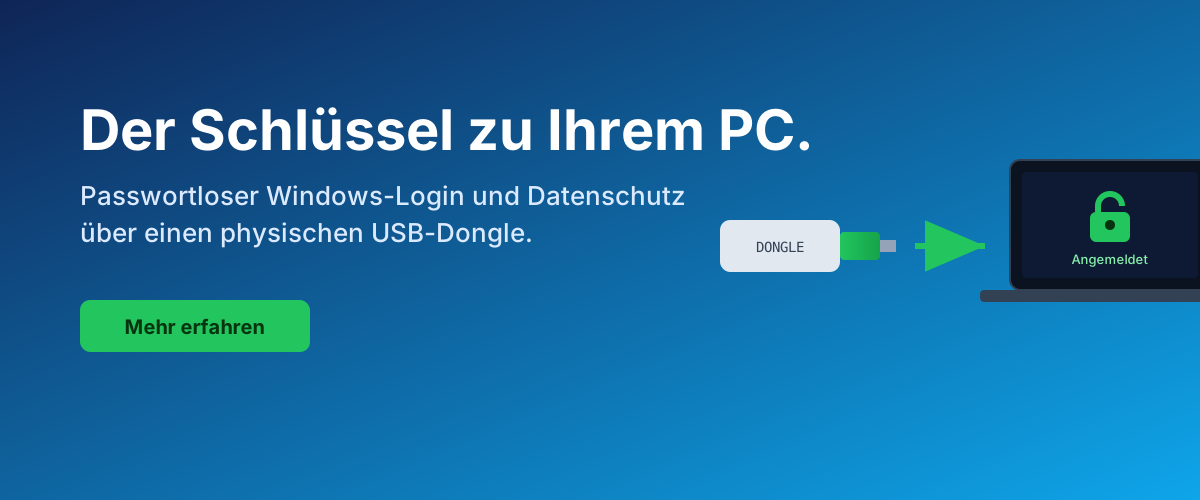

The dongle replaces password entry and selects the correct profile.

System and work data protected with BitLocker, no boot password required.

Different dongles open different accounts and data areas, cryptographically separated.

Central recovery of the dongles via this REST API. Copies for emergencies.
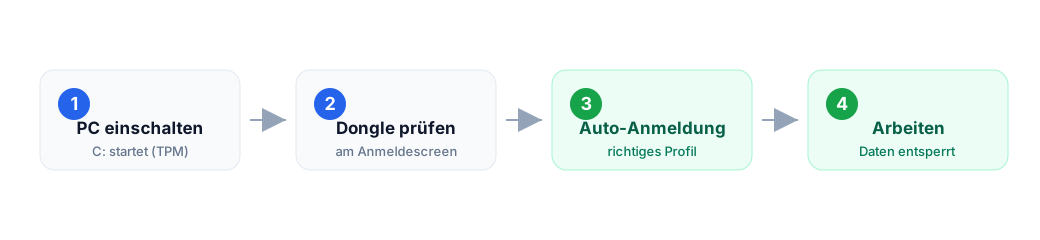
This is how it works in 3 steps
Screenshots from the running application


All visible values (role, account TB\tboehme, serial) are demo data, not real secrets.
REST API for the wizard
Central REST API for the SystemLocker WPF wizardStores dongle material (client-side AES-256-GCM encrypted), PCs, metrics, audit log in the Linkwerk database. Namespace: systemlocker/v1Base URL:
https://www.tb-software.ch/ai/en/wp-json/systemlocker/v1/.
Auth model
Two auth classes:
- Wizard (HMAC)Each request is signed with the installation’s own
apiKeyNo token, no session. Header:X-SL-Installation,X-SL-Timestamp,X-SL-Nonce,X-SL-Signature. - AdminEither WP-Admin-Login With
manage_options-right (Cookies) or headerX-SL-Admin-SecretWith the value fromSL_ADMIN_SECRETinwp-config.php.
Calculate HMAC signature (two formats are supported in parallel)
The server accepts both formats. New assistants use v2, older v1.
v2 — Specification 2.0 (recommended, corresponds to HmacRequestSigner.cs)
timestamp = ISO-8601 UTC ("2026-07-11T00:00:00Z")
nonce     = zufaellig, mind. 16 Byte
path      = "/dongles"                             # ab Namespace
body_hex  = hex(SHA256(body))                      # leerer Body: SHA256("")
canonical = f"{METHOD}\n{path}\n{timestamp}\n{nonce}\n{body_hex}"
signature = base64(HMAC-SHA256(key=apiKey, msg=canonical))

Headers:
  X-SL-Installation : <installationId>
  X-SL-Timestamp    : <timestamp ISO-8601>
  X-SL-Nonce        : <nonce>
  X-SL-Signature    : <signature base64>
v1 — Legacy (dot-format)
timestamp = int(Unix-Sekunden UTC)
nonce     = hex(random_bytes(16))
canonical = f"{timestamp}.{nonce}.{METHOD}.{fullpath}.{body}"
# fullpath = "/systemlocker/v1/dongles"  (mit Namespace-Prefix)
# body     = raw request body (leerer String bei GET)
signature = HMAC-SHA256(key=apiKey, msg=canonical).hex()
Server verification:
|now - timestamp| ≤ 300s(clock drift tolerance)- Nonce not in replay cache (temporary, 5-6 min)
hash_equals(expected, signature)
Endpoint overview
| Method | Path | Auth | Purpose |
|---|---|---|---|
| GET | /version | — | Server version, HMAC formats, function flags, known metric types |
| POST | /installations | Admin | Create new installation (returns apiKey + restorePassword ONCE) |
| GET | /installations | Admin | List all installations (without secrets) |
| DELETE | /installations/{id} | Admin | Delete installation (Audit) |
| GET | /installations/{id}/restore-password | Admin | Retrieve plaintext password (display audit + warning) |
| POST | /installations/{id}/restore-password/verify | HMAC | Verify recovery password without revealing it |
| POST | /installations/{id}/rotate-api-key | Admin | Generate new apiKey, invalidate old one |
| POST | /pcs | HMAC | Register/update PC (pcId = SHA-256 of hardwareId) |
| POST | /dongles | HMAC | Save dongle record (material already encrypted) |
| GET | /dongles | HMAC | Dongles of own installation (query: pcId, role, withMaterial) |
| GET | /dongles/{dongleId} | HMAC | Load individual dongle including material ciphertext |
| DELETE | /dongles/{dongleId} | Admin | Delete dongle record (audit) |
| POST | /metrics | HMAC | Ingest metric or batch |
| GET | /metrics | HMAC/Admin | Query metrics (pcId, type, fromUtc, toUtc) |
| GET | /audit | Admin | Read audit log (filter: installationId) |
Data models
3.1 Installation
{
  "installationId": "b3f1a2c4-...",
  "customerName":   "Muster AG",
  "createdUtc":     "2026-07-09T10:00:00Z"
}
Additionally in the response when creating (ONCE, never retrievable in plain text):
{
  "apiKey":          "sl_...",     // Wizard-Secret fuer HMAC
  "restorePassword": "A7fH3...",   // 32 Zeichen, wird gebraucht wenn kein DPAPI-Cache
}
3.2 PC
Request POST /pcs:
{ "hostname": "TBS-PC01", "os": "Windows 10 19045",
  "machineGuid": "...", "hardwareId": "..." }

Response:
{ "pcId": "sha256-..." }
3.3 DongleRecord
{
  "dongleId":     "d1a2...",           // Server-vergeben
  "installationId":"b3f1...",
  "role":         "Main | Backup1 | ...",
  "serialNumber": 1364915896,
  "account":      { "userName": "timo", "domain": ".", "profileId": "S-1-5-21-..." },
  "pcId":         "sha256-...",
  "sessionId":    "...",
  "material": {
    "algo":       "AES-256-GCM",
    "kdf":        "Argon2id",
    "salt":       "base64",
    "nonce":      "base64",
    "tag":        "base64",
    "ciphertext": "base64"
  },
  "createdUtc":   "2026-07-09T10:06:00Z",
  "version":      1
}
Important: K_d, S and the Windows password is ONLY stored in the material.ciphertext, encrypted with the restore key from
Argon2id(restorePassword, salt). The server never sees them in plain text.
3.4 Metric
{
  "type":         "login_success | login_denied | dongle_removed | heartbeat | custom",
  "value":        1,
  "pcId":         "sha256-...",
  "dongleId":     "d1a2-... | null",
  "data":         { "beliebig": "json" },
  "timestampUtc": "2026-07-09T10:07:00Z"
}
Examples
Create installation (Admin, curl)
curl -X POST "https://www.tb-software.ch/ai/en/wp-json/systemlocker/v1/installations" \
     -H "X-SL-Admin-Secret: $SL_ADMIN_SECRET" \
     -H "Content-Type: application/json" \
     -d '{"customerName":"Muster AG"}'

{
  "installationId": "b3f1a2c4-...",
  "customerName":   "Muster AG",
  "apiKey":         "sl_a1b2c3...",     <- unbedingt sichern
  "restorePassword":"A7fHmKq2X8...",    <- unbedingt sichern
  "createdUtc":     "2026-07-09T10:00:00Z"
}
Save dongle (HMAC) in wizard
import time, secrets, hmac, hashlib, json, urllib.request

installation = "b3f1a2c4-..."
api_key      = "sl_a1b2c3..."
body_obj     = { "role":"Main", "serialNumber":1364915896, "account":{...},
                 "pcId":"sha256-...", "sessionId":"...", "material":{...},
                 "version":1 }
body = json.dumps(body_obj, separators=(",",":"))
ts   = str(int(time.time()))
nonce= secrets.token_hex(16)
path = "/systemlocker/v1/dongles"
canonical = f"{ts}.{nonce}.POST.{path}.{body}"
sig  = hmac.new(api_key.encode(), canonical.encode(), hashlib.sha256).hexdigest()

req = urllib.request.Request(
    "https://www.tb-software.ch/ai/en/wp-json/systemlocker/v1/dongles",
    data=body.encode(),
    headers={
      "X-SL-Installation": installation,
      "X-SL-Timestamp":    ts,
      "X-SL-Nonce":        nonce,
      "X-SL-Signature":    sig,
      "Content-Type":      "application/json",
    },
    method="POST",
)
print(urllib.request.urlopen(req).read())
# -> 201 {"dongleId":"d1a2..."}
Verify restore password (no plain text reveal) in wizard
POST https://www.tb-software.ch/ai/en/wp-json/systemlocker/v1/installations/{id}/restore-password/verify
Headers: X-SL-*
Body:    { "restorePassword":"A7fHmKq2X8..." }
Response: 200 { "valid": true|false }
Retrieve restore password (Admin, with audit)
curl "https://www.tb-software.ch/ai/en/wp-json/systemlocker/v1/installations/{id}/restore-password" \
     -H "X-SL-Admin-Secret: $SL_ADMIN_SECRET"

{
  "installationId":  "b3f1...",
  "restorePassword": "A7fHmKq2X8...",
  "issuedUtc":       "2026-07-09T10:22:00Z",
  "auditId":         "..."
}
C# Client (WPF Wizard)
Copy-paste-ready reference implementation for .NET 6+/WPF Wizard.
HMAC via System.Security.Cryptography.HMACSHA256, JSON via
System.Text.Json, no third-party Nugets required.
HMAC client class
using System.Net.Http;
using System.Net.Http.Headers;
using System.Security.Cryptography;
using System.Text;
using System.Text.Json;

public sealed class SystemLockerClient
{
    private readonly HttpClient _http = new();
    private readonly string _base;      // "https://tb-software.ch/ai/wp-json/systemlocker/v1"
    private readonly string _installationId;
    private readonly string _apiKey;

    public SystemLockerClient(string baseUrl, string installationId, string apiKey)
    {
        _base = baseUrl.TrimEnd('/');
        _installationId = installationId;
        _apiKey = apiKey;
    }

    private HttpRequestMessage Sign(HttpMethod method, string routePath, string body = "")
    {
        // routePath MUSS mit Namespace-Prefix beginnen: "/systemlocker/v1/dongles"
        var ts    = ((long)(DateTime.UtcNow - DateTime.UnixEpoch).TotalSeconds).ToString();
        var nonce = Convert.ToHexString(RandomNumberGenerator.GetBytes(16)).ToLower();
        var canonical = $"{ts}.{nonce}.{method.Method}.{routePath}.{body}";
        using var h = new HMACSHA256(Encoding.UTF8.GetBytes(_apiKey));
        var sig = Convert.ToHexString(h.ComputeHash(Encoding.UTF8.GetBytes(canonical))).ToLower();

        var req = new HttpRequestMessage(method, _base + routePath.Substring("/systemlocker/v1".Length));
        req.Headers.Add("X-SL-Installation", _installationId);
        req.Headers.Add("X-SL-Timestamp",    ts);
        req.Headers.Add("X-SL-Nonce",        nonce);
        req.Headers.Add("X-SL-Signature",    sig);
        if (!string.IsNullOrEmpty(body))
            req.Content = new StringContent(body, Encoding.UTF8, "application/json");
        return req;
    }

    public async Task<JsonElement> PostAsync(string route, object payload)
    {
        var body = JsonSerializer.Serialize(payload, new JsonSerializerOptions{ WriteIndented = false });
        using var req = Sign(HttpMethod.Post, route, body);
        using var r   = await _http.SendAsync(req);
        var text = await r.Content.ReadAsStringAsync();
        return JsonDocument.Parse(text).RootElement.Clone();
    }

    public async Task<JsonElement> GetAsync(string route)
    {
        using var req = Sign(HttpMethod.Get, route);
        using var r   = await _http.SendAsync(req);
        var text = await r.Content.ReadAsStringAsync();
        return JsonDocument.Parse(text).RootElement.Clone();
    }
}
Register PC + save dongle
var sl = new SystemLockerClient(
    "https://www.tb-software.ch/ai/en/wp-json/systemlocker/v1",
    installationId: "b3f1a2c4-...",
    apiKey:         "sl_a1b2c3...");

// PC upsert
var pc = await sl.PostAsync("/systemlocker/v1/pcs", new {
    hostname    = Environment.MachineName,
    os          = Environment.OSVersion.VersionString,
    machineGuid = ReadRegistryMachineGuid(),
    hardwareId  = ComputeHardwareFingerprint(),
});
string pcId = pc.GetProperty("pcId").GetString();

// Material clientseitig verschluesseln (Argon2id KDF, AES-256-GCM)
// -> siehe SystemLocker.Crypto.PackDongleMaterial(...)
var material = SystemLocker.Crypto.PackDongleMaterial(
    Kd, S, account, credentialBlob, restorePassword, installationId, dongleId);

// Dongle speichern (Server sieht Chiffrat, NIE Klartext)
var d = await sl.PostAsync("/systemlocker/v1/dongles", new {
    role         = "Main",
    serialNumber = donglePcsc.Serial,
    account      = new { userName = "timo", domain = ".", profileId = "S-1-5-..." },
    pcId         = pcId,
    sessionId    = Guid.NewGuid().ToString(),
    material     = material,   // { algo, kdf, salt, nonce, tag, ciphertext }
    version      = 1,
});
string dongleId = d.GetProperty("dongleId").GetString();
.3 Verify restore password (no plaintext disclosure)
var v = await sl.PostAsync(
    $"/systemlocker/v1/installations/{installationId}/restore-password/verify",
    new { restorePassword = enteredPassword });
bool valid = v.GetProperty("valid").GetBoolean();
.4 Ingest metrics (batch)
await sl.PostAsync("/systemlocker/v1/metrics", new [] {
    new { type = "login_success", value = 1, pcId = pcId, timestampUtc = DateTime.UtcNow.ToString("O") },
    new { type = "heartbeat",     value = 1, pcId = pcId, timestampUtc = DateTime.UtcNow.ToString("O") },
});
.5 Error handling
if (r.StatusCode == HttpStatusCode.Unauthorized) {
    var err = json.GetProperty("error").GetProperty("message").GetString();
    // Moegliche Werte: missing_hmac_headers, bad_timestamp, nonce_reused,
    //                  bad_signature, unknown_installation, api_key_decrypt_failed
    throw new SystemLockerAuthException(err);
}
Security model (summary)
- The server sees Metadata in plain text (customer, PC, role, timestamp).
- The server sees Dongle material ONLY as ciphertext under the client-side restore key.
- The server sees the reset password in plain text during creation (it generated it) and afterwards only encrypted with
SL_MASTER_KEYDer Master-Schlüssel befindet sich inwp-config.phpoutside the DB. - Vendor-Escrow (Variant A)Der Admin kann Passwörter wiederherstellen.
Jede Ausgabe wird geprüft (
tb_sl_audit). - Sensitive actions run via
X-SL-Admin-SecretOR WP-Admin session. - All Wizard requests are HMAC-signed. Replay protection via Nonce transient + 5-min window.
Fehlerformat
{ "error": { "code": "unauthorized", "message": "bad_signature" } }HTTP codes: 200 OK · 201 Created ·
202 Accepted · 204 No Content ·
400 Bad Request · 401 Unauthorized ·
403 Forbidden · 404 Not Found ·
409 Conflict.